Foundations
Cassy Dorff and Shahryar Minhas
2026-07-12
Source:vignettes/foundations.Rmd
foundations.Rmdpackage overview
You supply dyadic data, and netify turns it into network
objects that work with summary, plotting, and modeling tools. The
package is built for social-science network data, especially peace
science data, but the same workflow works for many dyadic data sets.
This vignette walks through the main workflow: create a network, inspect it, plot it, add attributes, and pass it to other network packages.
The main workflow has three parts:
- Create: Build network objects from dyadic data and attach nodal or dyadic variables.
- Explore: Summarize networks at the graph and actor levels, then visualize the results.
- Model: Prepare the network for other R network packages.
The table below lists common functions for each part of the workflow.
netify begins with the user’s data input. Our core
function, netify(), handles several different data inputs
including data frames and edgelists (see documentation for more
detail).
-
The package can also create different types of networks including:
- cross sectional networks
- longitudinal (with static and varying actor composition)
- bipartite networks
- multilayer
-
As well as create networks with different edge types:
- weighted
- binary
- symmetric or non-symmetric
step 1: create
Begin by loading packages and supplying the data. We will use the
peacesciencer package to grab some familiar data.
# load packages
library(netify)
library(peacesciencer)
library(dplyr)
library(ggplot2)

# organize external data for peacesciencer
peacesciencer::download_extdata()

# build a dyadic panel with peacesciencer
cow_dyads <- create_dyadyears(
    subset_years = c(1995:2014)
) |>
    # add mid data
    add_cow_mids() |>
    # add capital distance
    add_capital_distance() |>
    # add democracy
    add_democracy() |>
    # add gdp
    add_sim_gdp_pop(keep = c("pwtrgdp", "pwtpop"))
Next, create a netlet object from the COW data frame
with netify(). The main arguments are:
-
inputis, in this use case, a dyadic data.frame that should have at the following variables used to specify actors:-
actor1: names the first actor column -
actor2: names the second actor column
-
timenames the period variable for longitudinal data.output_formatsets the storage shape when you need one explicitly ("cross_sec","longit_array", or"longit_list"); otherwisenetify()picks from the input structure.
mid_long_network <- netify(
    input = cow_dyads,
    actor1 = "ccode1", actor2 = "ccode2", time = "year",
    weight = "cowmidonset",
    actor_time_uniform = FALSE,
    sum_dyads = FALSE, symmetric = TRUE,
    diag_to_NA = TRUE, missing_to_zero = TRUE,
    nodal_vars = c("v2x_polyarchy1", "v2x_polyarchy2"),
    dyad_vars = c("capdist"),
    dyad_vars_symmetric = c(TRUE)
)
## ! Converting `actor1` and/or `actor2` to character vector(s).## ℹ `netify()` collapsed repeated actor-time rows before attaching nodal
## variables.
## • Numeric nodal variables were averaged; non-numeric variables use the most
## common non-missing value within each key.
## This message is displayed once per session.You have created a network object.
You can also add nodal and dyadic data after creating the network
with add_node_vars() and add_dyad_vars().
For example, add logged GDP for each actor-year:
# build one actor-year row for each node
node_data <- bind_rows(
    cow_dyads |>
        select(actor = ccode1, year, pwtrgdp = pwtrgdp1),
    cow_dyads |>
        select(actor = ccode2, year, pwtrgdp = pwtrgdp2)
) |>
    distinct(actor, year, .keep_all = TRUE) |>
    mutate(pwtrgdp_log = log(pwtrgdp + 1))

# attach the nodal variable
mid_long_network <- add_node_vars(
    netlet = mid_long_network,
    node_data = node_data,
    actor = "actor",
    time = "year"
)

# build a dyadic distance variable
cow_dyads$log_capdist <- log(cow_dyads$capdist + 1)

# attach the dyadic variable
mid_long_network <- add_dyad_vars(
    netlet = mid_long_network,
    dyad_data = cow_dyads,
    actor1 = "ccode1",
    actor2 = "ccode2",
    time = "year",
    dyad_vars = "log_capdist",
    dyad_vars_symmetric = TRUE
)
step 2: explore and summarize
We made a network, so let’s look at it. First, we might want to take
a peek at the network object to see if the matrix looks the
way we’d expect it to look. This function lets you glance at a specific
slice of the network if it is longitudinal or the entire network if it
is cross-sectional. (To actually subset the netlet object and make a new
object use netify’s subset function.)
## $`2009`
##     100 101 110 115 130
## 100  NA   1   0   0   1
## 101   1  NA   0   0   0
## 110   0   0  NA   0   0
## 115   0   0   0  NA   0
## 130   1   0   0   0  NA
##
## $`2010`
##     100 101 110 115 130
## 100  NA   1   0   0   0
## 101   1  NA   0   0   0
## 110   0   0  NA   0   0
## 115   0   0   0  NA   0
## 130   0   0   0   0  NA
Next, let’s examine a few basic summary statistics about the network
using oursummary() function.
# build network-level summary statistics
mid_long_summary <- summary(mid_long_network)
We can also make a quick visualization of network statistics over time using the summary statistics data frame.
plot_graph_stats(mid_long_summary)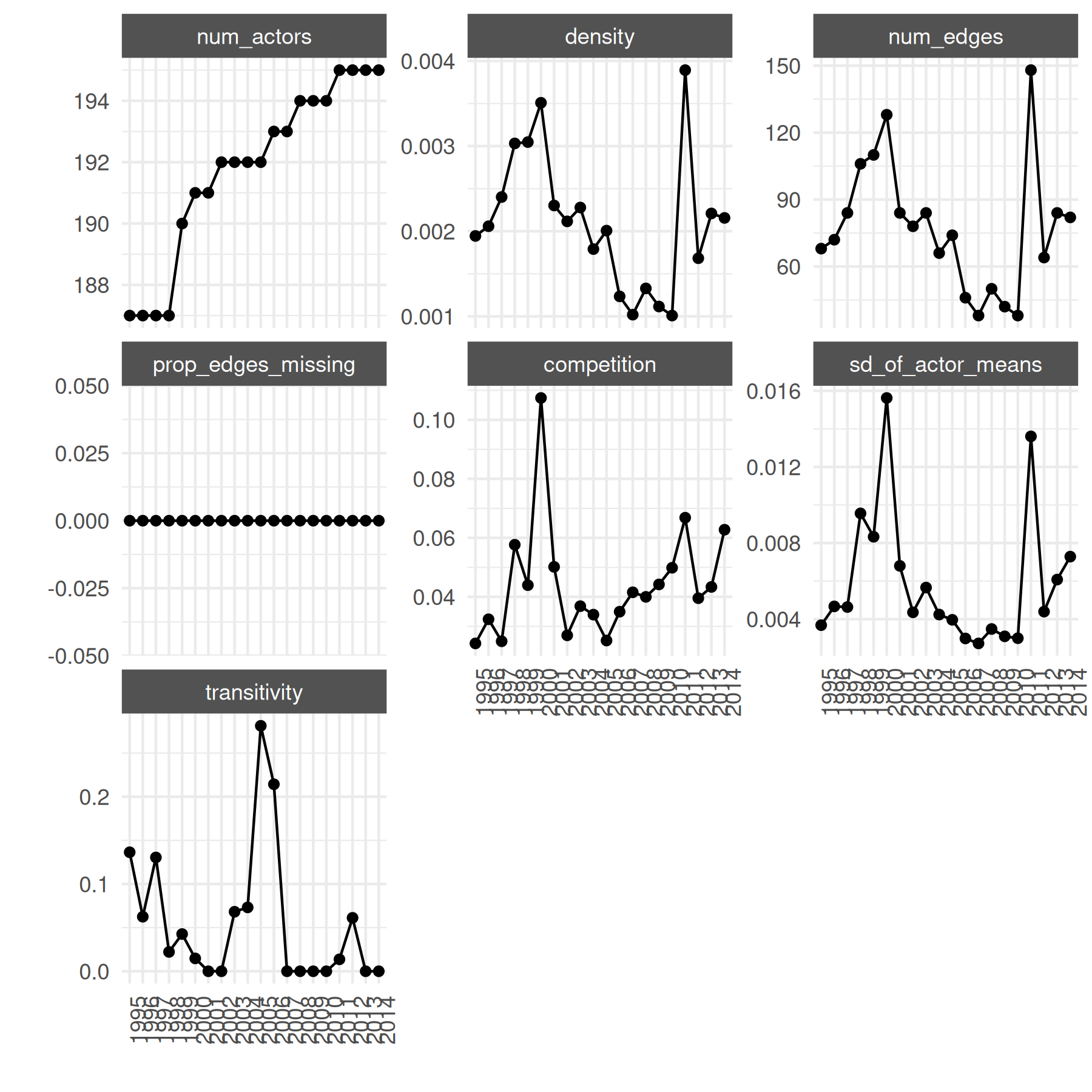
These graph statistics are useful for understanding changes over time
at the network level. We might also want to look at actor-level
statistics over time. The built-in summary_actor() function
calculates actor-level degree, strength, and centrality statistics for
each actor in each time period. The plot_actor_stats()
function can show distributions across actors or trajectories for
selected actors:
# summarize every actor-year
summary_actor_mids <- summary_actor(mid_long_network)
head(summary_actor_mids)
## actor time degree prop_ties network_share closeness betweenness
## 1 100 1995 1 0.005376344 0.01470588 1 0
## 2 101 1995 1 0.005376344 0.01470588 1 0
## 3 110 1995 0 0.000000000 0.00000000 NaN 0
## 4 115 1995 0 0.000000000 0.00000000 NaN 0
## 5 130 1995 1 0.005376344 0.01470588 1 0
## 6 135 1995 1 0.005376344 0.01470588 1 0
## eigen_vector
## 1 0
## 2 0
## 3 0
## 4 0
## 5 0
## 6 0We can look at the distribution of the statistic for all actors over time:
# plot actor-level distributions
plot_actor_stats(
    summary_actor_mids,
    across_actor = TRUE
)
## Warning: Removed 2913 rows containing non-finite outside the scale range
## (`stat_density_ridges()`).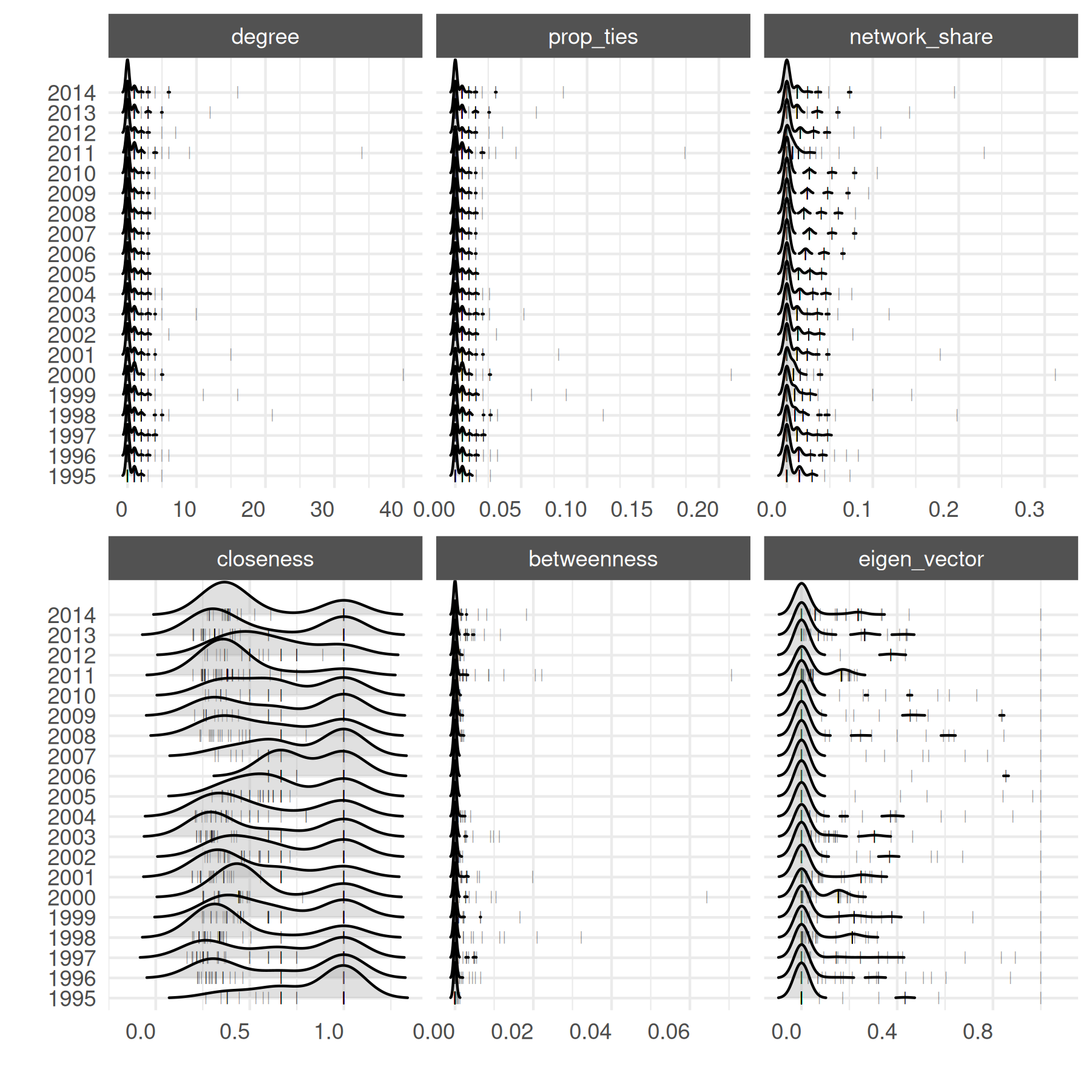
Or we might like to select a specific statistic to focus on across actors over time:
# focus on closeness
plot_actor_stats(
    summary_actor_mids,
    across_actor = TRUE,
    specific_stats = "closeness"
)
## Picking joint bandwidth of 0.114## Warning: Removed 2913 rows containing non-finite outside the scale range
## (`stat_density_ridges()`).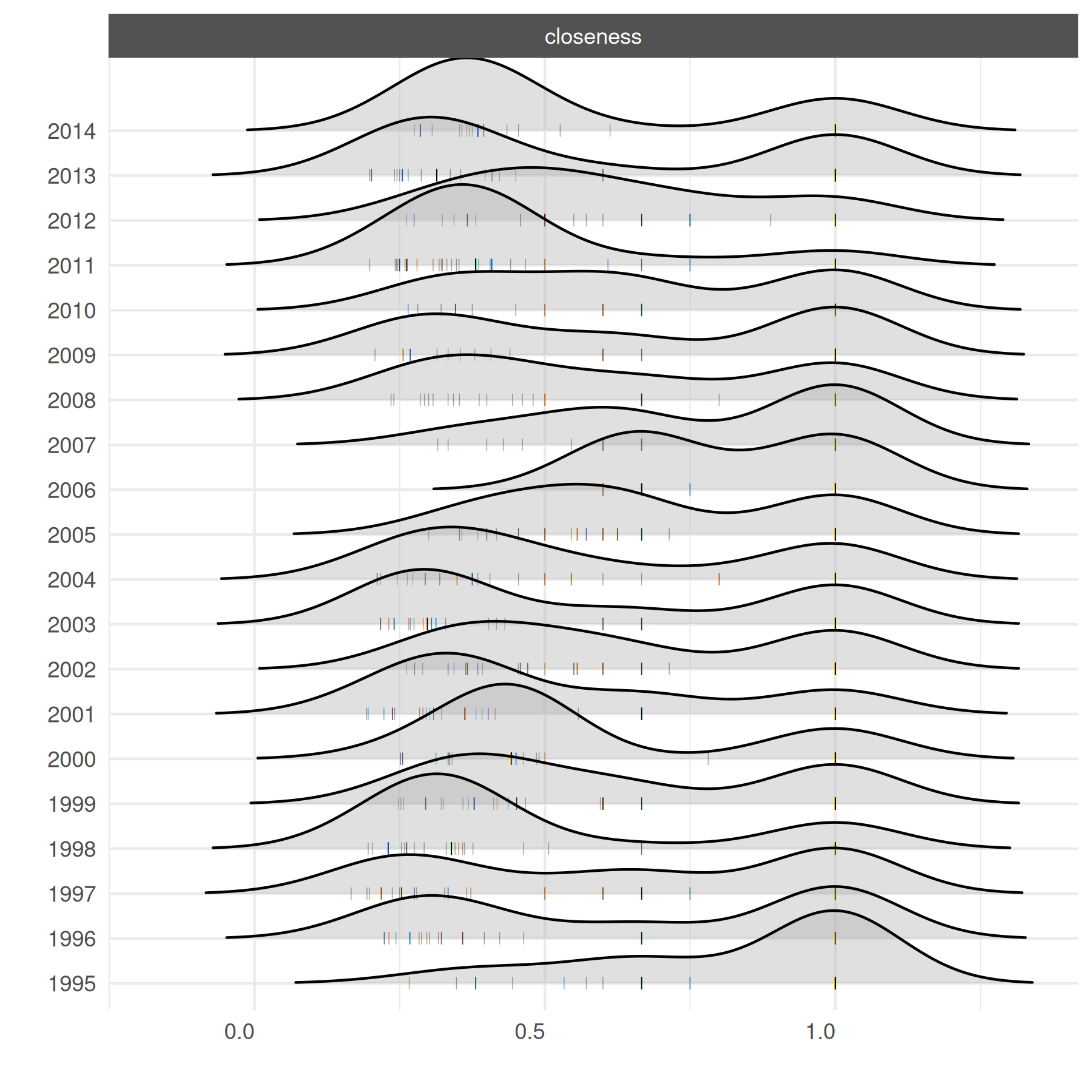
For actor-specific statistics over time, subset to a few actors so the plot stays legible.
# selected high-gdp countries
top_5 <- c("2", "710", "740", "255", "750")

plot_actor_stats(
    summary_actor_mids,
    across_actor = FALSE,
    specific_actors = top_5
)
## Warning: Removed 2058 rows containing missing values or values outside the scale range
## (`geom_line()`).## Warning: Removed 2913 rows containing missing values or values outside the scale range
## (`geom_point()`).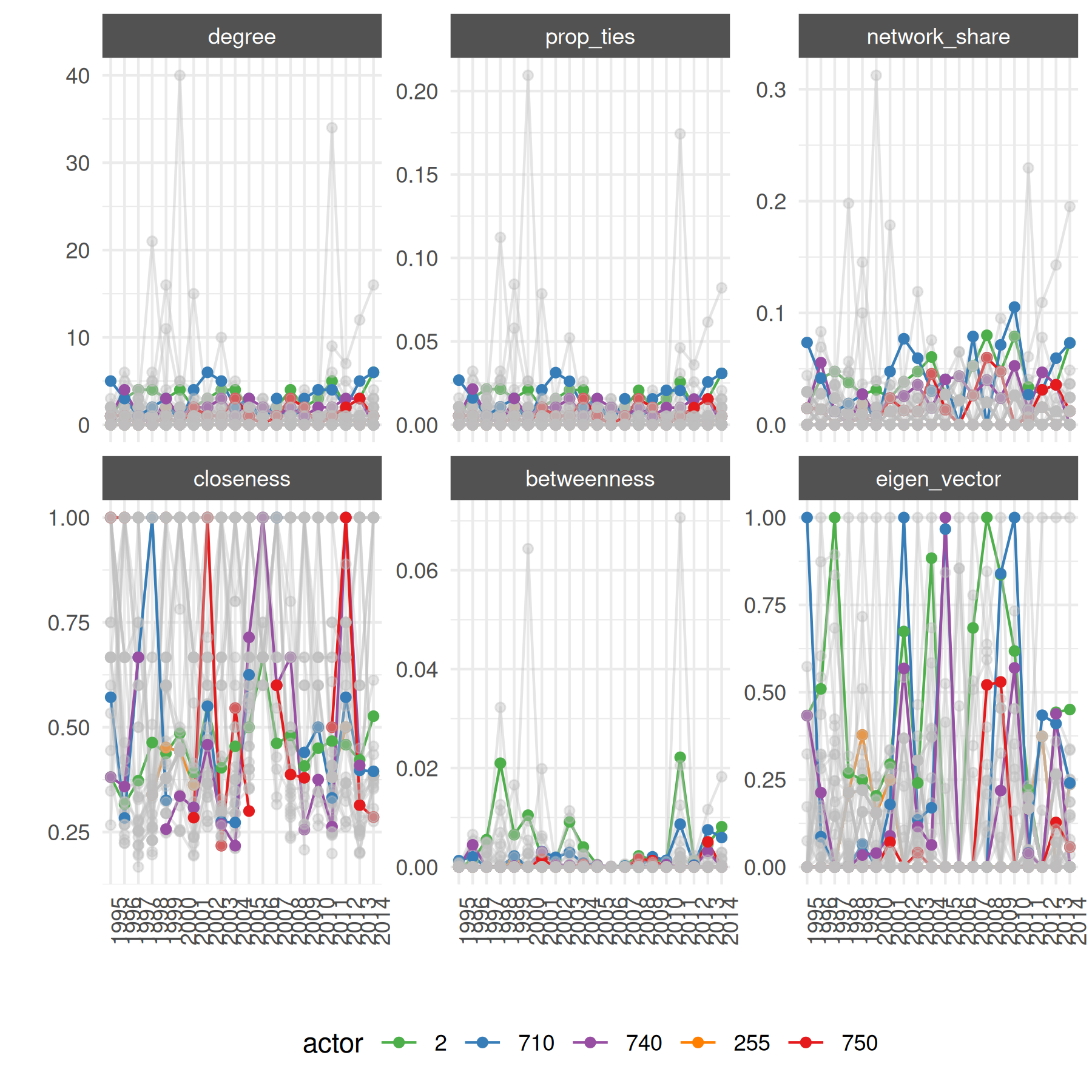
We can also zoom into a specific time slice of the network:
summary_df_static <- summary_actor_mids[summary_actor_mids$time == 2011, ]

plot_actor_stats(
    summary_df_static,
    across_actor = FALSE,
    specific_actors = top_5
)
## ! Note: The `summary_df` provided only has one unique time point, so longitudinal will be set to FALSE.## Warning: Removed 123 rows containing missing values or values outside the scale range
## (`position_quasirandom()`).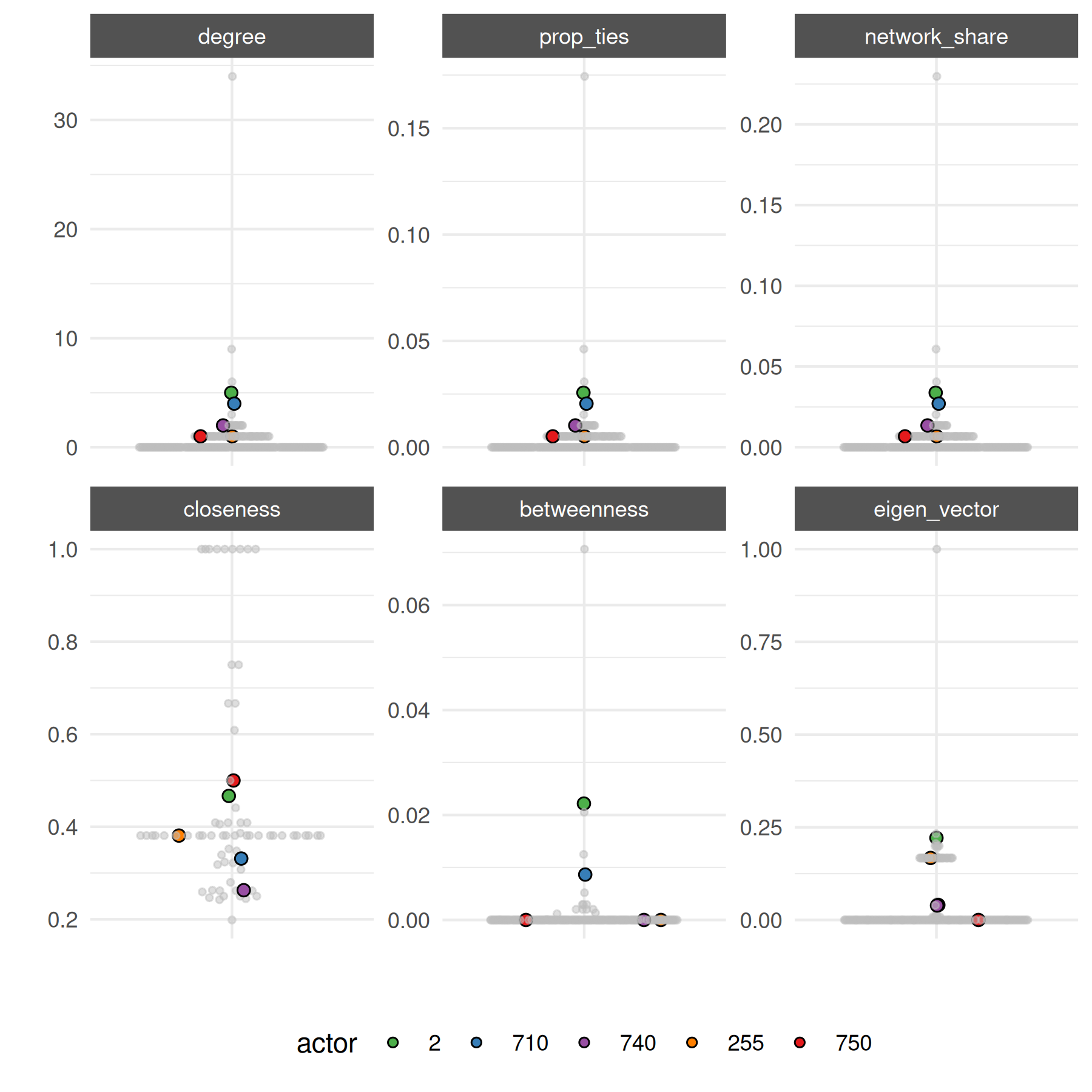
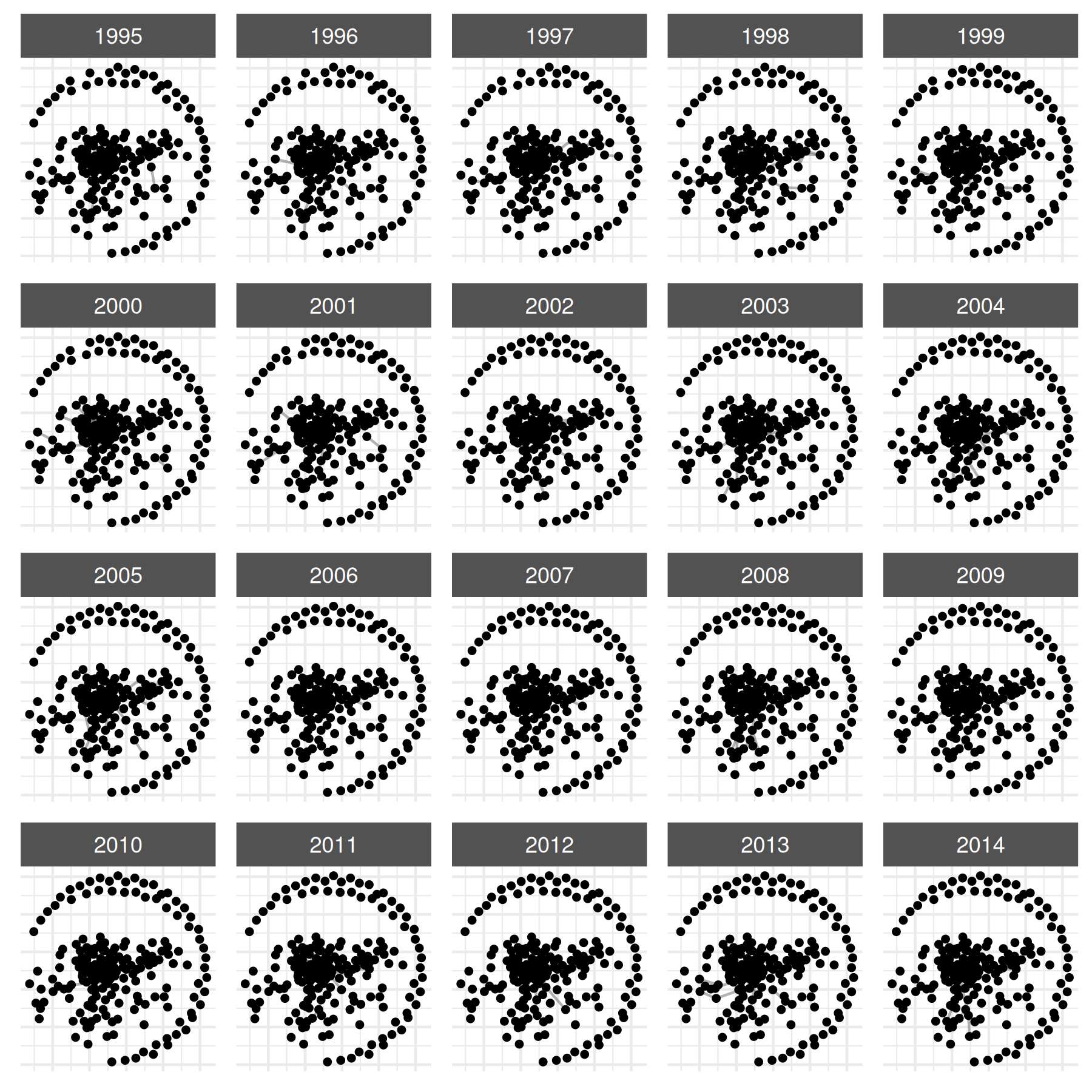
Instead of looking at summary statistics, we also might want to simply visualize the entire network. We can do this by plotting the netify object.
By default, plot() uses auto_format = TRUE,
which automatically adjusts aesthetics based on your network’s
properties — node sizes scale down for larger networks, edge
transparency increases for denser networks, and text labels appear for
small networks (≤15 nodes). You can disable this with
auto_format = FALSE for full manual control, or simply
override any individual parameter.
# default plot with auto_format
plot(mid_long_network,
    static_actor_positions = TRUE,
    remove_isolates = FALSE
)
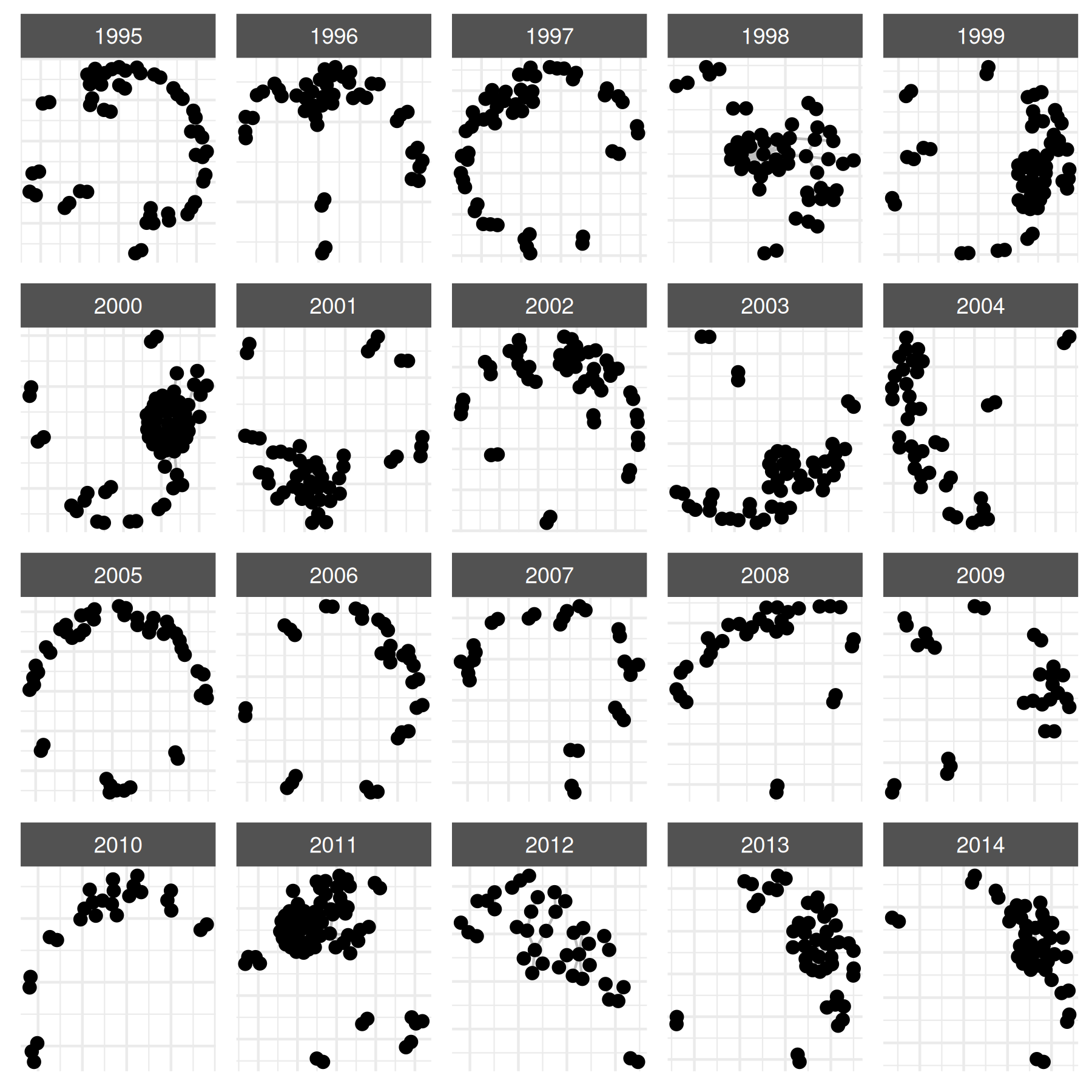
# override specific defaults
plot(
    mid_long_network,
    edge_color = "grey",
    node_size = 2
)
You can also map actor-level summary statistics onto the network plot.
# attach actor statistics
mid_long_network <- add_node_vars(
    mid_long_network,
    summary_actor_mids,
    actor = "actor", time = "time",
    node_vars = c("degree", "prop_ties", "eigen_vector"),
)
Print the object to inspect its metadata.
# inspect the netlet object
print(mid_long_network)
## ✔ Network data created.
## • Unipartite
## • Symmetric
## • Weights from `cowmidonset`
## • Longitudinal: 20 Periods
## • # Unique Actors: 195
## Network Summary Statistics (averaged across time):
## dens miss trans
## cowmidonset 0.002 0 0.056
## • Nodal Features: v2x_polyarchy1, v2x_polyarchy2, pwtrgdp, pwtrgdp_log, degree,
## prop_ties, eigen_vector
## • Dyad Features: capdist, log_capdistThe nodal attributes are stored on the object.
##   actor time v2x_polyarchy1 v2x_polyarchy2  pwtrgdp pwtrgdp_log degree
## 1     2 1995          0.868      0.4670133 13375583    16.40894      1
## 2     2 1996          0.869      0.4712102 14136908    16.46430      3
## 3     2 1997          0.871      0.4801139 14480122    16.48829      4
## 4     2 1998          0.871      0.4788467 15268303    16.54129      4
## 5     2 1999          0.868      0.4815762 16085312    16.59342      3
## 6     2 2000          0.867      0.4808235 16191328    16.59999      4
##     prop_ties eigen_vector
## 1 0.005376344    0.4334163
## 2 0.016129032    0.5097062
## 3 0.021505376    1.0000000
## 4 0.021505376    0.2690264
## 5 0.015873016    0.2492445
## 6 0.021052632    0.2037526
head(attributes(mid_long_network)$nodal_data)## actor time v2x_polyarchy1 v2x_polyarchy2 pwtrgdp pwtrgdp_log degree
## 1 2 1995 0.868 0.4670133 13375583 16.40894 1
## 2 2 1996 0.869 0.4712102 14136908 16.46430 3
## 3 2 1997 0.871 0.4801139 14480122 16.48829 4
## 4 2 1998 0.871 0.4788467 15268303 16.54129 4
## 5 2 1999 0.868 0.4815762 16085312 16.59342 3
## 6 2 2000 0.867 0.4808235 16191328 16.59999 4
## prop_ties eigen_vector
## 1 0.005376344 0.4334163
## 2 0.016129032 0.5097062
## 3 0.021505376 1.0000000
## 4 0.021505376 0.2690264
## 5 0.015873016 0.2492445
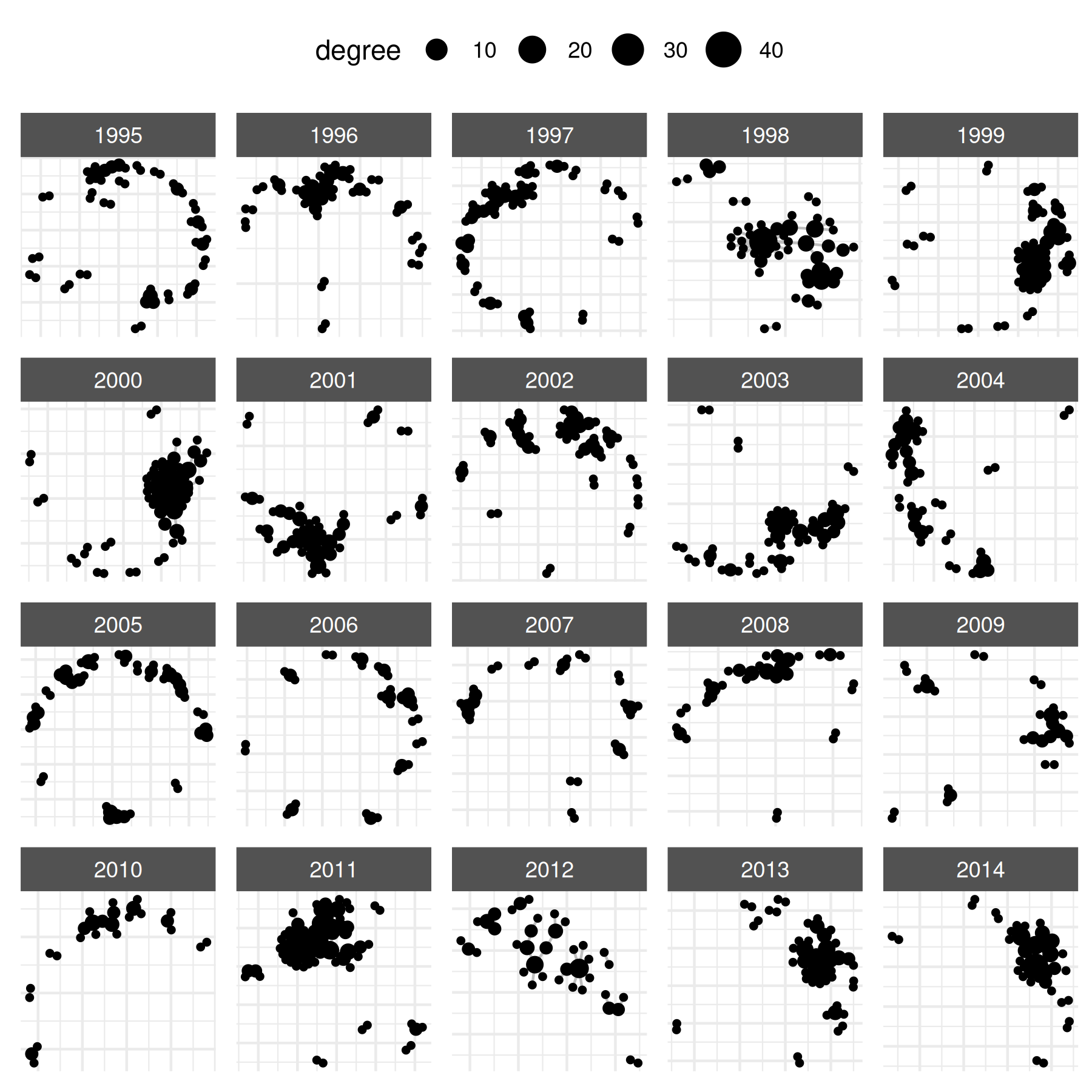
## 6 0.021052632 0.2037526And now return to our network graph by highlighting specific nodal
attributes. To map visual properties to data, we use the
node_*_by naming convention (e.g.,
node_size_by, node_color_by). The legacy
point_*_var names (e.g., point_size_var) also
work identically if you prefer that style.
# vary node size by degree
plot(
    mid_long_network,
    edge_color = "grey",
    node_size_by = "degree"
)
# vary node color by polyarchy
plot(
    mid_long_network,
    edge_color = "grey",
    node_size_by = "degree",
    node_color_by = "v2x_polyarchy1",
    node_color_label = "Polyarchy",
    node_size_label = "Degree"
) +
    scale_color_gradient2()
## Scale for colour is already present.
## Adding another scale for colour, which will replace the existing scale.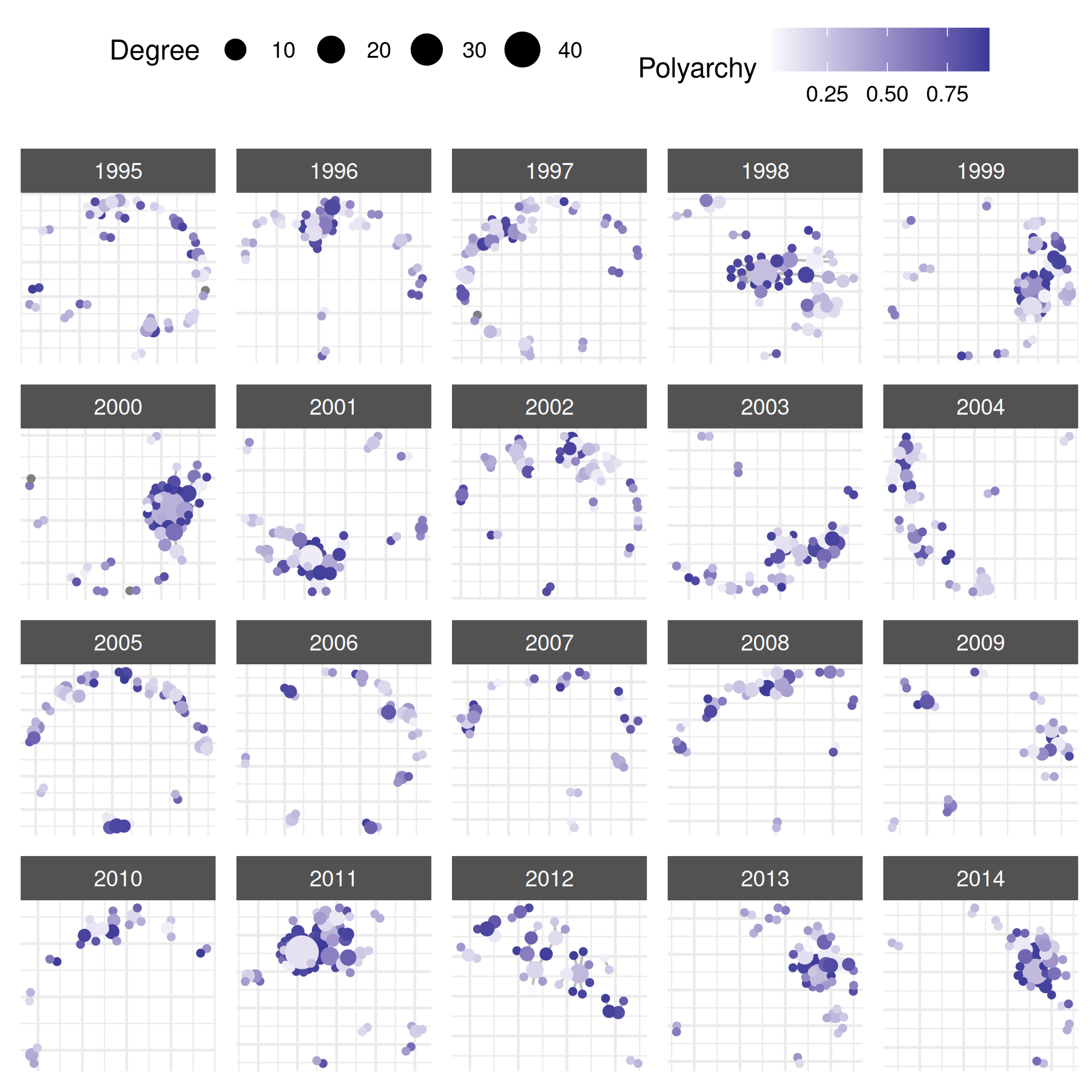
We might also prefer to add labels, but only a select few:
library(countrycode)
cowns <- countrycode(
    c(
        "United States", "China", "Russia",
        "France", "Germany", "United Kingdom"
    ),
    "country.name", "cown"
)
cabbs <- countrycode(cowns, "cown", "iso3c")

plot(
    mid_long_network,
    edge_color = "grey",
    node_size_by = "degree",
    node_color_by = "v2x_polyarchy1",
    node_color_label = "Polyarchy",
    node_size_label = "Degree",
    select_text = cowns,
    select_text_display = cabbs,
    text_size = 3
) +
    scale_color_gradient2()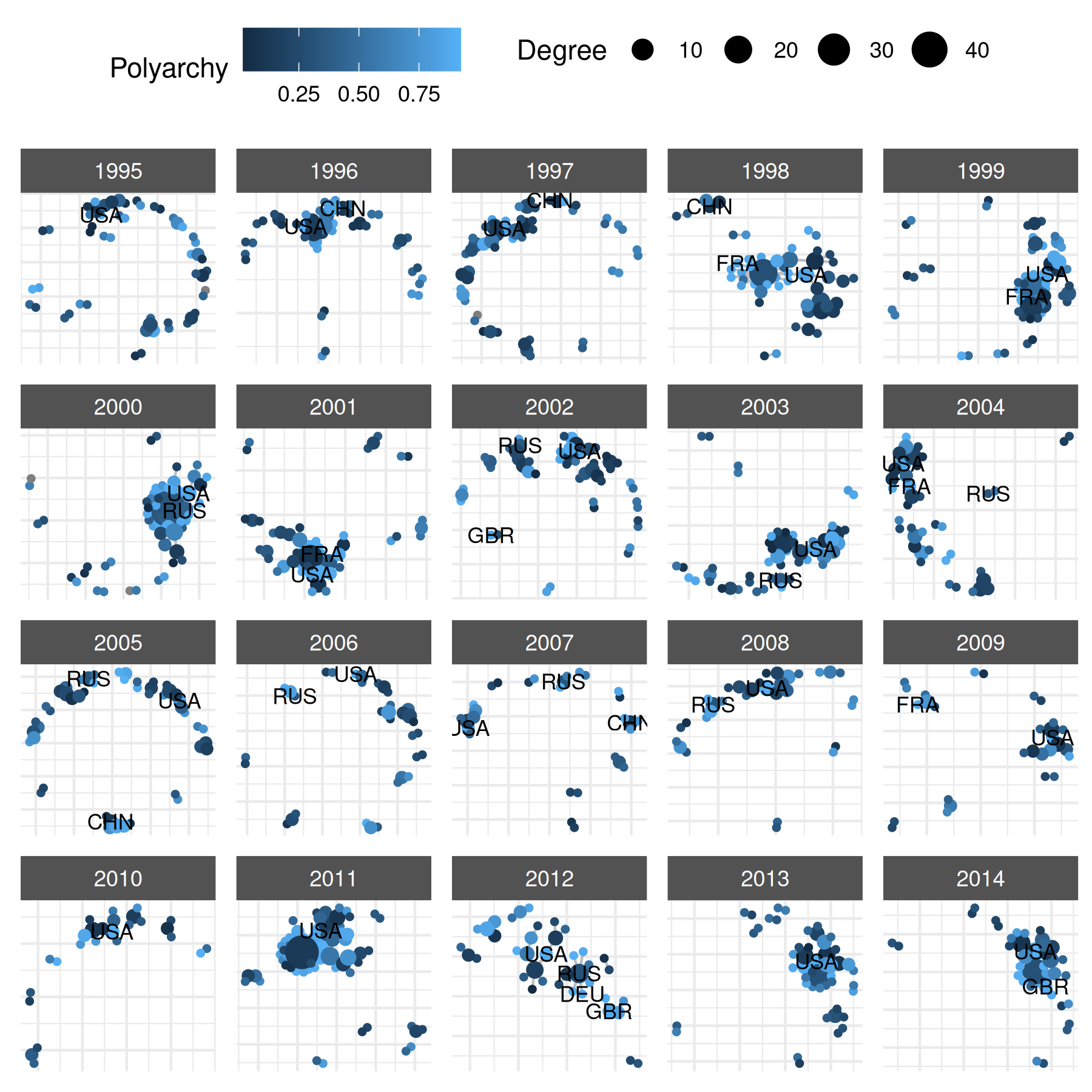
# draw labels without points
plot(
    mid_long_network,
    edge_color = "grey",
    add_points = FALSE,
    add_label = TRUE,
    label_size_var = "degree",
    label_color = "white",
    label_fill_var = "v2x_polyarchy1",
    label_fill_label = "Polyarchy",
    label_size_label = "Degree"
) + guides(size = "none")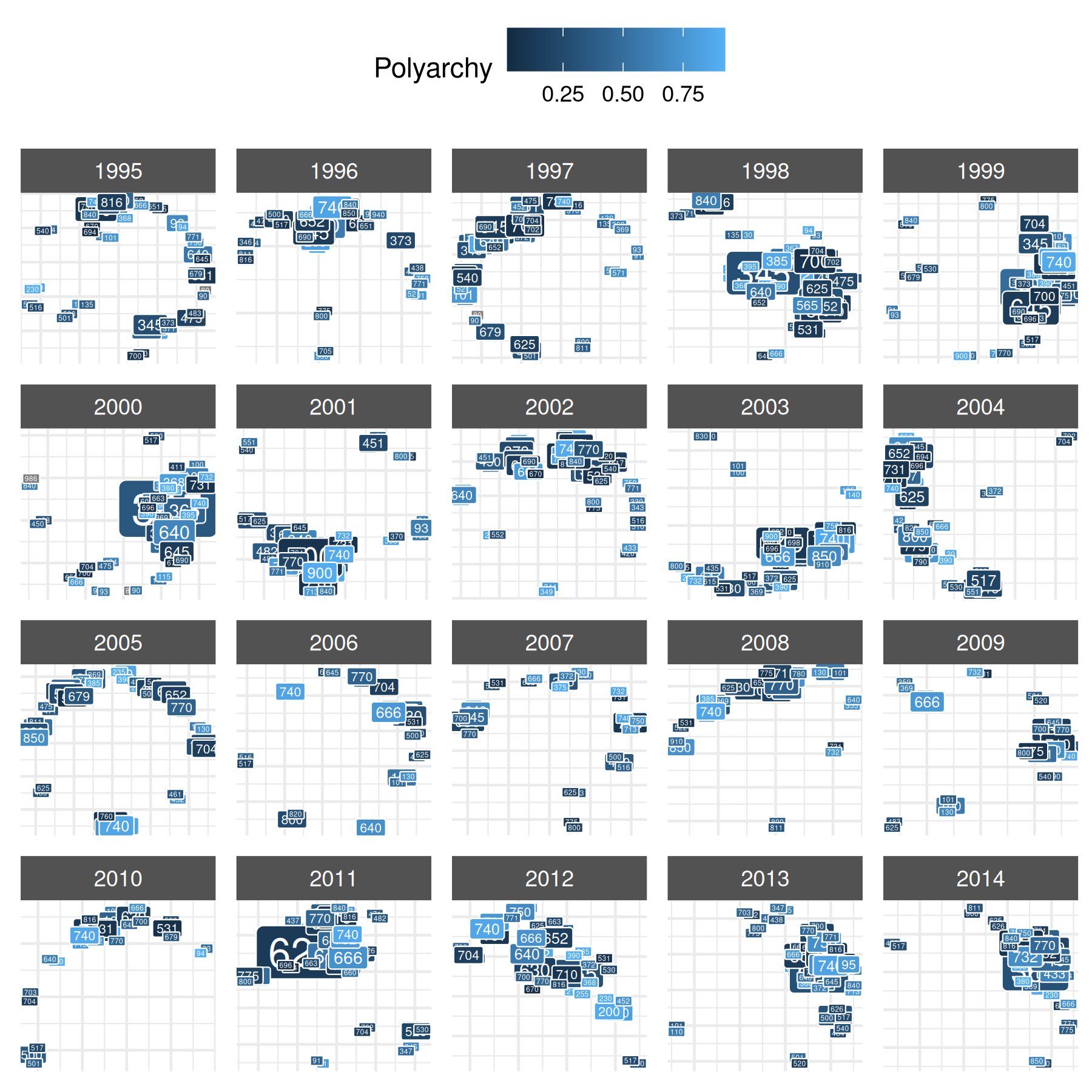
extracting data back to a data frame
If you need to convert a netify object back into a dyadic data frame
— for example, to run regressions or export to other software — use
unnetify():
##   from  to time cowmidonset   capdist
## 1  100 101 1995           1 1024.5480
## 2  100 110 1995           0 1779.6330
## 3  100 115 1995           0 2101.0041
## 4  100 130 1995           0  732.7128
## 5  100 135 1995           0 1889.2499
## 6  100 140 1995           0 2853.6456
This returns one row per dyad with all nodal and dyadic attributes
merged in. Use remove_zeros = TRUE to keep only non-zero
edges for a more compact result.
step 3: model
After creating and exploring the network, you can pass it to other modeling packages. The examples below use a cross-sectional network.
First, prepare the data:
# prepare cross-sectional data
cow_cross <- cow_dyads |>
    group_by(ccode1, ccode2) |>
    summarize(
        cowmidonset = ifelse(any(cowmidonset > 0), 1, 0),
        capdist = mean(capdist),
        polity21 = mean(polity21, na.rm = TRUE),
        polity22 = mean(polity22, na.rm = TRUE),
        pwtrgdp1 = mean(pwtrgdp1, na.rm = TRUE),
        pwtrgdp2 = mean(pwtrgdp2, na.rm = TRUE),
        pwtpop1 = mean(pwtpop1, na.rm = TRUE),
        pwtpop2 = mean(pwtpop2, na.rm = TRUE)
    ) |>
    ungroup() |>
    mutate(
        capdist = log(capdist + 1)
    )

# subset to actors with average population above 10 million
actor_to_keep <- cow_cross |>
    select(ccode1, pwtpop1) |>
    filter(pwtpop1 > 10) |>
    distinct(ccode1)

# filter cow_cross by actor_to_keep
cow_cross <- cow_cross |>
    filter(ccode1 %in% actor_to_keep$ccode1) |>
    filter(ccode2 %in% actor_to_keep$ccode1)

# build cross-sectional netlet
mid_cross_network <- netify(
    cow_cross,
    actor1 = "ccode1", actor2 = "ccode2",
    weight = "cowmidonset",
    sum_dyads = FALSE, symmetric = TRUE,
    diag_to_NA = TRUE, missing_to_zero = FALSE,
    nodal_vars = c(
        "polity21", "polity22", "pwtrgdp1",
        "pwtrgdp2", "pwtpop1", "pwtpop2"
    ),
    dyad_vars = c("capdist"),
    dyad_vars_symmetric = c(TRUE)
)
Next, pass the netify object to amen. This section
requires the amen package
(install.packages("amen")).
library(amen)

# prepare amen inputs
mid_cross_amen <- netify_to_amen(mid_cross_network)

# inspect amen inputs
str(mid_cross_amen)
## List of 4
## $ Y : num [1:86, 1:86] NA 1 1 0 0 0 0 0 0 0 ...
## ..- attr(*, "dimnames")=List of 2
## .. ..$ : chr [1:86] "100" "101" "130" "135" ...
## .. ..$ : chr [1:86] "100" "101" "130" "135" ...
## $ Xdyad: num [1:86, 1:86, 1] 0 6.93 6.6 7.54 7.96 ...
## ..- attr(*, "dimnames")=List of 3
## .. ..$ : chr [1:86] "100" "101" "130" "135" ...
## .. ..$ : chr [1:86] "100" "101" "130" "135" ...
## .. ..$ : chr "capdist"
## $ Xrow : num [1:86, 1:6] 7 4.3 6.38 6.28 8 ...
## ..- attr(*, "dimnames")=List of 2
## .. ..$ : chr [1:86] "100" "101" "130" "135" ...
## .. ..$ : chr [1:6] "polity21" "polity22" "pwtrgdp1" "pwtrgdp2" ...
## $ Xcol : num [1:86, 1:6] 7 4.3 6.38 6.28 8 ...
## ..- attr(*, "dimnames")=List of 2
## .. ..$ : chr [1:86] "100" "101" "130" "135" ...
## .. ..$ : chr [1:6] "polity21" "polity22" "pwtrgdp1" "pwtrgdp2" ...
# fit amen model
mid_amen_mod <- ame(
    Y = mid_cross_amen$Y,
    Xdyad = mid_cross_amen$Xdyad,
    family = "bin",
    R = 0,
    symmetric = TRUE,
    seed = 6886,
    nscan = 50,
    burn = 10,
    odens = 1,
    plot = FALSE,
    print = FALSE
)
We can apply the same process to ERGMs. This section requires the
ergm package (install.packages("ergm")).
## Loading required package: network##
## 'network' 1.20.0 (2026-02-06), part of the Statnet Project
## * 'news(package="network")' for changes since last version
## * 'citation("network")' for citation information
## * 'https://statnet.org' for help, support, and other information## Registered S3 methods overwritten by 'ergm':
## method from
## simulate.formula lme4
## simulate.formula_lhs lme4##
## 'ergm' 4.12.0 (2026-02-17), part of the Statnet Project
## * 'news(package="ergm")' for changes since last version
## * 'citation("ergm")' for citation information
## * 'https://statnet.org' for help, support, and other information## 'ergm' 4 is a major update that introduces some backwards-incompatible
## changes. Please type 'news(package="ergm")' for a list of major
## changes.
# netify_to_statnet converts to a network object,
# which is what ergm uses
mid_cross_ergm <- netify_to_statnet(mid_cross_network)
## ! Nodal columns with "NA" detected: "polity21". Ergm terms like
## `nodecov()`/`nodematch()` will refuse to fit.
## ℹ Use `drop_na_actors(net, cols = c('polity21'))` (or impute) before refitting.
## This message is displayed once per session.## ℹ Dyad covariates attached as per-edge attributes under "capdist_e" and as
## network-level matrices under their original names ("capdist").
## ℹ For `ergm::edgecov()` use the matrix name (e.g. `edgecov('capdist')`); the
## "_e" per-edge attribute is for descriptive use such as edge styling.
## This message is displayed once per session.
# inspect statnet attributes
mid_cross_ergm
## Network attributes:
## vertices = 86
## directed = FALSE
## hyper = FALSE
## loops = FALSE
## multiple = FALSE
## bipartite = FALSE
## cowmidonset: 86x86 matrix
## capdist: 86x86 matrix
## total edges= 149
## missing edges= 0
## non-missing edges= 149
##
## Vertex attribute names:
## polity21 polity22 pwtpop1 pwtpop2 pwtrgdp1 pwtrgdp2 vertex.names
##
## Edge attribute names:
## capdist_e cowmidonset
# replace missing nodecov values for the example
set.vertex.attribute(
    mid_cross_ergm, "polity21",
    ifelse(
        is.na(get.vertex.attribute(mid_cross_ergm, "polity21")),
        0, get.vertex.attribute(mid_cross_ergm, "polity21")))

set.vertex.attribute(
    mid_cross_ergm, "pwtrgdp2",
    ifelse(
        is.na(get.vertex.attribute(mid_cross_ergm, "pwtrgdp2")),
        0, get.vertex.attribute(mid_cross_ergm, "pwtrgdp2")) )

set.vertex.attribute(
    mid_cross_ergm, "pwtpop2",
    ifelse(
        is.na(get.vertex.attribute(mid_cross_ergm, "pwtpop2")),
        0,  get.vertex.attribute(mid_cross_ergm, "pwtpop2")) )

# fit ergm model
ergm_model <- ergm(
    formula = mid_cross_ergm ~
        edges +
        nodecov("polity21") +
        nodecov("pwtrgdp2") +
        nodecov("pwtpop2")
)
## Starting maximum pseudolikelihood estimation (MPLE):
## Obtaining the responsible dyads.
## Evaluating the predictor and response matrix.
## Maximizing the pseudolikelihood.
## Finished MPLE.
## Evaluating log-likelihood at the estimate.references
Csárdi G, Nepusz T, Traag V, Horvát S, Zanini F, Noom D, Müller K (2024). igraph: Network Analysis and Visualization in R. doi:10.5281/zenodo.7682609, R package version 2.0.3, https://CRAN.R-project.org/package=igraph.
Davies, Shawn, Therese Pettersson & Magnus Öberg (2023). Organized violence 1989-2022 and the return of conflicts between states?. Journal of Peace Research 60(4).
Handcock M, Hunter D, Butts C, Goodreau S, Krivitsky P, Morris M (2018). ergm: Fit, Simulate and Diagnose Exponential-Family Models for Networks. The Statnet Project (https://statnet.org/). R package version 3.9.4, https://CRAN.R-project.org/package=ergm.
Hoff, Peter D. “Dyadic data analysis with amen.” arXiv preprint arXiv:1506.08237 (2015).
Högbladh Stina, 2023, “UCDP GED Codebook version 23.1”, Department of Peace and Conflict Research, Uppsala University
Miller S (2022). “peacesciencer: An R Package for Quantitative Peace Science Research.” Conflict Management and Peace Science, 39(6), 755–779. doi: 10.1177/07388942221077926.
Statnet Development Team (Pavel N. Krivitsky, Mark S. Handcock, David R. Hunter, Carter T. Butts, Chad Klumb, Steven M. Goodreau, and Martina Morris) (2003-2023). statnet: Software tools for the Statistical Modeling of Network Data. URL https://statnet.org/
Sundberg, Ralph and Erik Melander (2013) Introducing the UCDP Georeferenced Event Dataset. Journal of Peace Research 50(4).